
The details were already there.
Before someone sends money, the recipient has usually shared everything the sender needs.
The problem starts when those details have to be entered into Foren.
Nobody wants to type a long account number by hand, so people copy and paste. But they can only copy one piece at a time.
Copy the first name from WhatsApp. Switch to Foren and paste it. Go back for the last name, then the account number, then the routing number.
- Copy one field in WhatsApp
- Switch to Foren
- Paste it
- Switch back
- Repeat for every field
Every field means another trip between two apps.
And people don't always receive bank details in a neat format. Some get a simple list. Others get a long WhatsApp message, an invoice, or a screenshot.
The information was already there. We were just making people do too much work to use it.
I wanted to remove that extra work without making the transfer harder to trust.
One small mistake can cause a big problem.
Entering bank details isn't just another form to fill in. Get something wrong, and a transfer could fail, be delayed, or need to be corrected.
US bank details can also be confusing if you're not familiar with the banking system. For example, ACH and wire transfers can require different routing numbers.
Here were some of the problems I wanted to solve.
The wrong number goes into a field.
Foren needs to recognise the labels and put each detail in the right place.
An ACH number is used for a wire transfer.
The transfer method needs to match the details the recipient provided.
A routing number is mistyped.
Foren should check whether the number is valid before the user continues.
An old bank address is copied from an invoice.
Where possible, bank information should come from a trusted source rather than relying on an old message.
The form was asking people to understand, enter, and check information they had already received.
I wanted Foren to take on more of that work.
I needed to understand where people were getting stuck.
I knew entering bank details was frustrating, but I didn't want to design a solution based on that feeling alone.
I looked at support tickets, product analytics, and how people actually received and entered bank details.
Support tickets
About one in five support tickets related to failed or delayed USD transfers traced back to incorrect recipient details. Common issues included swapped numbers, missing digits, and using an ACH routing number for a wire transfer.
Product analytics
Mixpanel showed that adding a USD recipient took a median of 3 minutes and 40 seconds. In 38% of sessions, users left the app four or more times before finishing the form. That gave us a clearer picture of how often people were switching between apps to copy and paste details.
User interviews
I spoke with 12 users: eight people sending money to family or freelancers, and four small businesses paying suppliers. I asked how they received bank details and what they did to enter them into Foren.
The details came from different places:
How people receive US bank details
- WhatsApp or text46%
- Email21%
- Invoice or PDF14%
- Screenshot12%
- Other7%
Two comments stuck with me.
“I copy one thing, go back, copy the next. By the routing number I've forgotten which one I already did.”
“My supplier sends everything in one WhatsApp message. Why can't I just give the app that message?”
Ten of the 12 people said they would rather paste the whole message than enter each detail separately.
That gave me a clear direction: let people paste first, while keeping manual entry available for anyone who prefers it.
The interviews also showed that people received details in different formats and sometimes used SWIFT instead of ACH or wire details. That helped shape what the new flow needed to support.
What if people could just paste the whole message?
Instead of asking users to fill in each field, I explored a simpler flow.
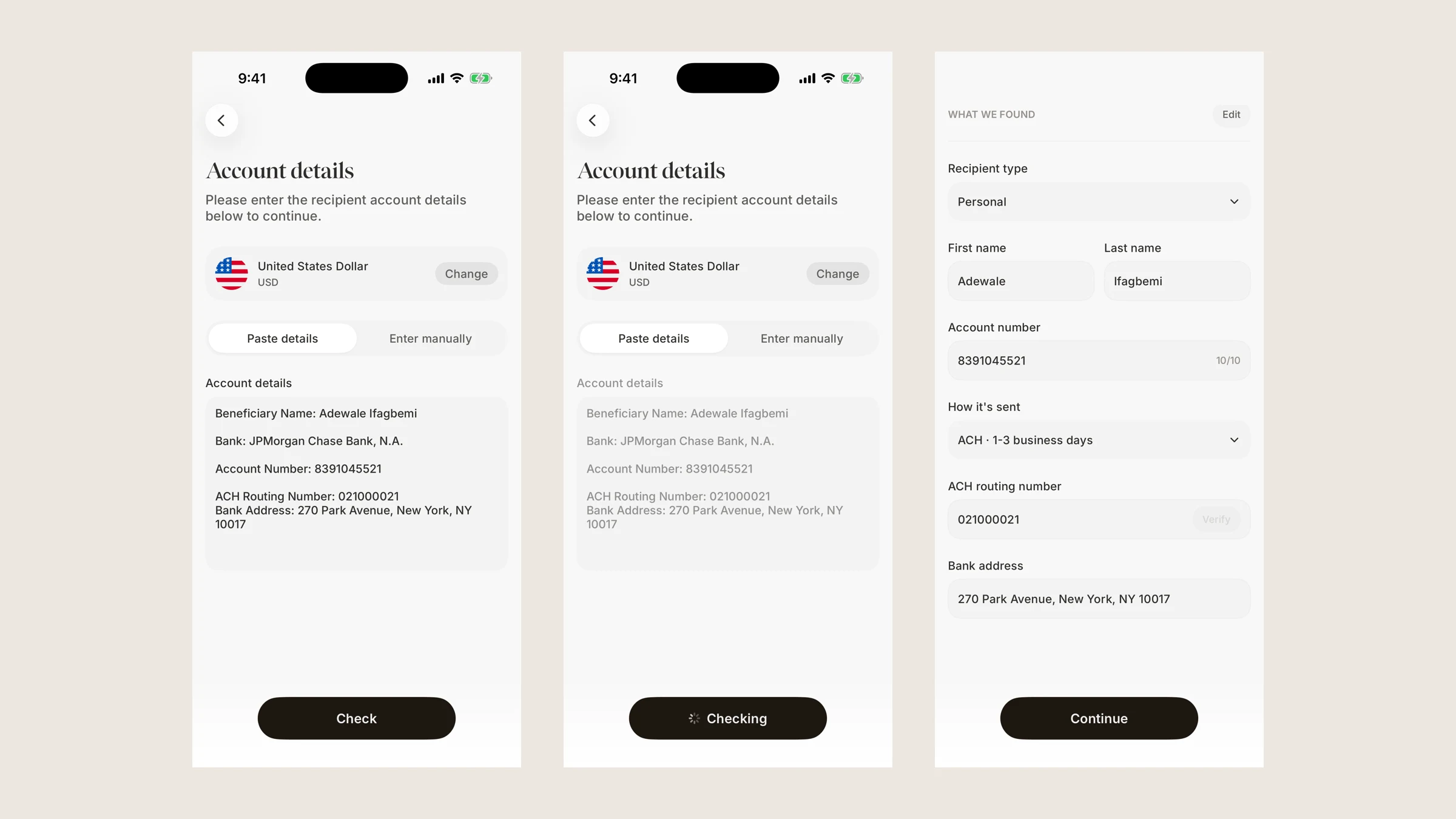
They would paste the message they received. Foren would read it, find the details it recognised, and put them into the right fields.
The flow had four steps.
- 01Paste
Paste the details as they arrived, whether they came from WhatsApp, an email, or another text source.
- 02Check
Foren reads the message and finds the bank details.
- 03Review
A bottom sheet shows what Foren found and checks the bank details.
- 04Continue
If everything looks right, the user continues. If something needs fixing, they can edit it.
Manual entry stays available, too. Pasting is simply another way to get the job done.
The idea was to save people time without taking away their chance to check the details before sending money.
Make it clear that something is happening.
After someone pasted their message, Foren needed a moment to read and check it.
I didn't want that moment to feel like the app had stopped working.
While Foren processed the text, the pasted message dimmed and a soft colour moved across it. The button changed to “Checking” so the user could see that the app was working.
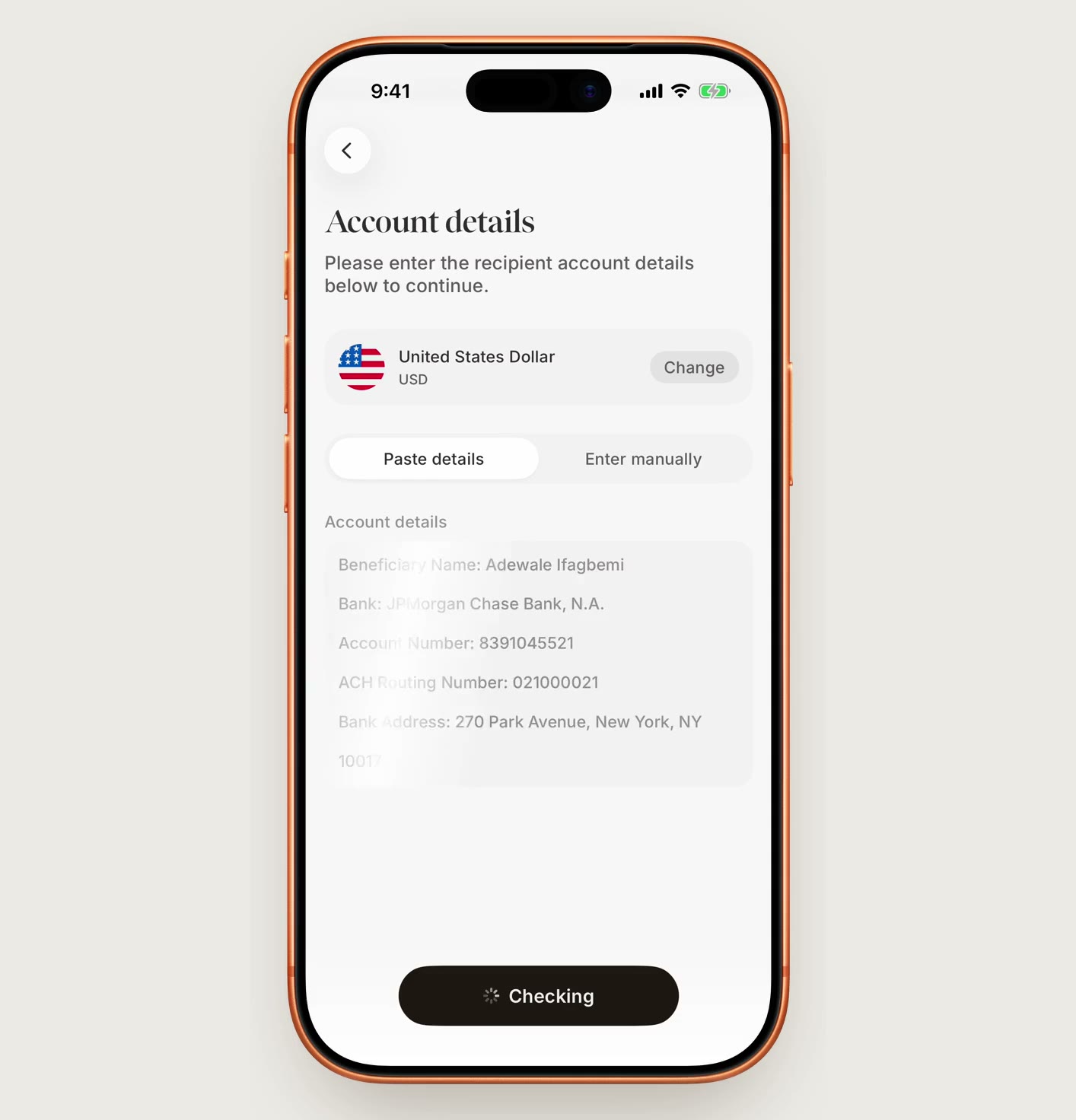
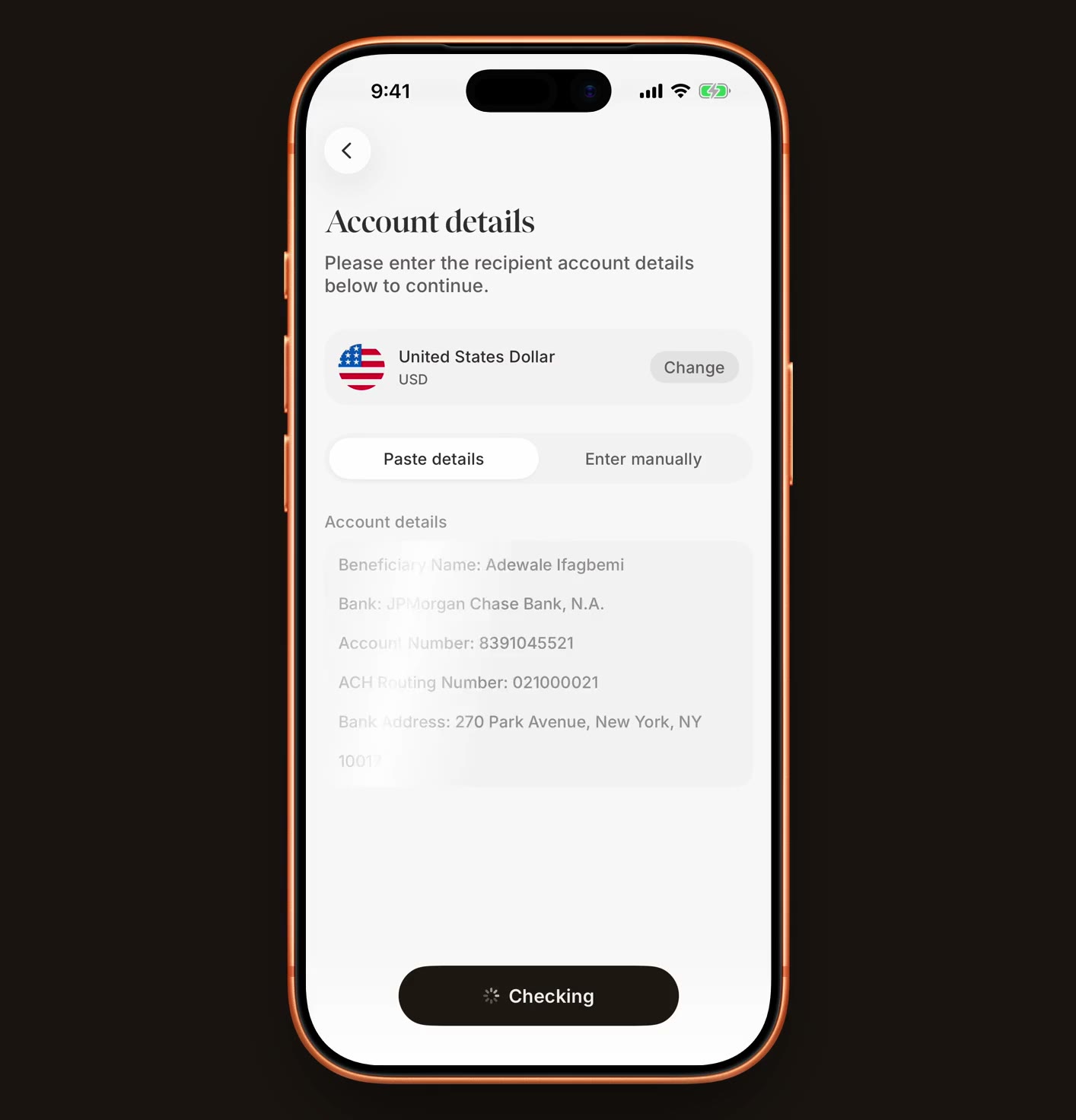


I also added a small animation when the button was pressed. It made the action feel more immediate.
These were small details, but they helped answer a simple question in the user's mind: did the app receive what I just pasted?
The first version looked right, but something was missing.
My first approach was to fill in the form with the details Foren had found.
I added a heading, “What we found”, and left any missing details empty rather than guessing.
The form also changed depending on who the user was paying. For a business, the first-name and last-name fields became one business-name field.
It worked, but when we tested it, two problems became clear.
People thought they still had to fill in the form.
The screen looked just like the manual entry form. Some users thought the paste had failed and that they had been sent back to enter everything themselves.
People checked every single field.
Because every detail looked like an editable input, users felt they had to read each one carefully. That took away some of the time we had just saved.
Their feedback made the problem clear.
“Wait, did the paste not work? Why am I back to typing everything in?”
“I still had to read every box, so what did pasting actually save me?”
“I didn't know what the app had changed and what I had typed, so I checked it all against the message line by line.”
The app had done the work, but the screen wasn't making that clear.
The second version: show the answer, not another form.
I changed the result from a filled-in form to a bottom sheet with a simple heading: “We found these details.”
The new design made three things clearer.
The details were there to review.
Each detail appeared as read-only text instead of an editable field. It looked like a result, not another form to complete.
The bank check was visible.
The routing number was checked with the bank, and the sheet showed the bank's name and whether the check had passed.
The next step was simple.
Users could tap Continue if everything looked right or Edit if they needed to change something.
I also kept the pasted message visible behind the sheet. Users could see where the details came from.
For business recipients, the sheet showed a building icon instead of a person's initial, making the difference easier to spot.
When we tested the new version, the feedback was much better.
“Oh, it just shows me what it found. I glanced at the name and the account number and hit Continue.”
“Okay, so it says Verified next to the bank, which honestly means I don't have to go and double-check the routing number myself.”
That was the change I wanted. Instead of making people review another form, the screen helped them quickly understand what Foren had found.
Teach the app how people actually share bank details.
The hard part wasn't adding a text box. It was helping Foren understand messages written in different ways.
Someone might write “Account Number”, “Acct #” or “A/C No.” They all mean the same thing, but the app needs to recognise that.
I worked on a system that combined clear rules with AI to find the right details.
Start with the labels.
If a message says “ABA” or “Routing Number”, Foren uses that label to identify the field.
Check the numbers.
A US routing number has nine digits and follows a checksum rule. These checks help confirm whether a number looks valid.
Make sense of names.
If a name appears surname first, Foren can put it in the right order when the format is clear.
Ignore details that don't belong.
An intermediary bank isn't necessarily the bank receiving the money. A phone number shouldn't become an account number just because it appears nearby.
Rules worked well for details with a clear format. AI helped with less predictable messages, such as working out which name belonged to the recipient or which number was the account number.
For example, Foren could read this:
“send to Grace Liu chase acct 778812340091 aba 021000021”
And organise the details into separate fields:
Recipient
Grace Liu
Account number
778812340091
Routing number
021000021
The same approach helped with less tidy messages.
Payee: Okafor, Chiamaka
Chiamaka Okafor, with the name put in the right order when the format was clear.
Brightline Studio LLC | Wells Fargo | A/C No. 7712093845
A business name and an account number from a line in an invoice.
Intermediary bank: Citibank N.A., ABA 021000089
Ignored, instead of being treated as the recipient's bank information.
I wanted Foren to be careful about what it filled in. If it couldn't identify a detail with enough confidence, leaving the field empty was better than making a guess.
Let the bank confirm what it can.
Not everything in a message should be trusted just because someone pasted it.
A recipient's account details tell us who the sender wants to pay. But information about the bank, such as whether a routing number is valid and which bank it belongs to, needs to be checked against a trusted source.
So I treated those as two separate things.
From the recipient's message
The recipient's name and account details.
From the bank check
Whether the routing number is recognised and which bank it belongs to.
This difference shaped the bottom sheet. It showed the details found in the message, followed by the bank's name and a check that changed from “Checking” to “Verified” when the check passed.
I also made room for different transfer methods. If the recipient provided ACH, wire, or SWIFT details, the interface showed the relevant method rather than silently choosing another one.
If the routing number wasn't recognised, the sheet showed “Not recognised” and disabled Continue. The user could select Edit to correct the details.
The principle was simple: use the message to understand what the recipient sent, and use a trusted source to check what the bank can confirm.
Less copying. Fewer mistakes. Faster transfers.
The new flow changed how people entered recipient details.
Fewer problems caused by missing digits, swapped numbers, and incorrect recipient information.
Less time switching between apps and fewer delays caused by mistakes that needed fixing.
Source: Mixpanel product analytics.
The bigger change was that people no longer had to enter every detail one at a time when they already had the information in front of them.
Instead of making users do the same work again, Foren could help them move from the message to a form they could review.
Automation only helps when people can trust it.
At first, this looked like a small improvement to a form. Let people paste their details and fill in the fields automatically.
But the problem was bigger than typing.
People were moving information between apps, trying to understand unfamiliar banking terms, and hoping they hadn't made a mistake. I wanted Foren to take on more of that work.
The first version taught me something important. Filling in the form wasn't enough. People still thought they had to do the work themselves because the screen looked like manual entry.
Changing the result into a simple summary made the next step clearer. Users could see what Foren found, check the important details, and continue without reviewing every field as if they had typed it themselves.
I also learned that automation shouldn't mean filling in everything at any cost. It means getting the right information into the right place, checking what can be checked, and making it clear when something needs attention.
The recipient had already shared their bank details.
Nobody should have to enter them all over again.