01
Someone needs to approve this
Approval should be simple. The workflow behind it shouldn't be.
Imagine a member creates a request. It now needs another person to review it before anything happens. The approver has to know what the request is, decide what to do, and leave a clear record of that decision.
So there were two sides to the experience. On one side, someone has to create the rules. On the other, someone has to follow those rules and make a decision.
Create the workflow
Receive a request
Review it
Approve or reject
Record the decision
The challenge was never designing an Approve button. It was designing the system around that button.
02
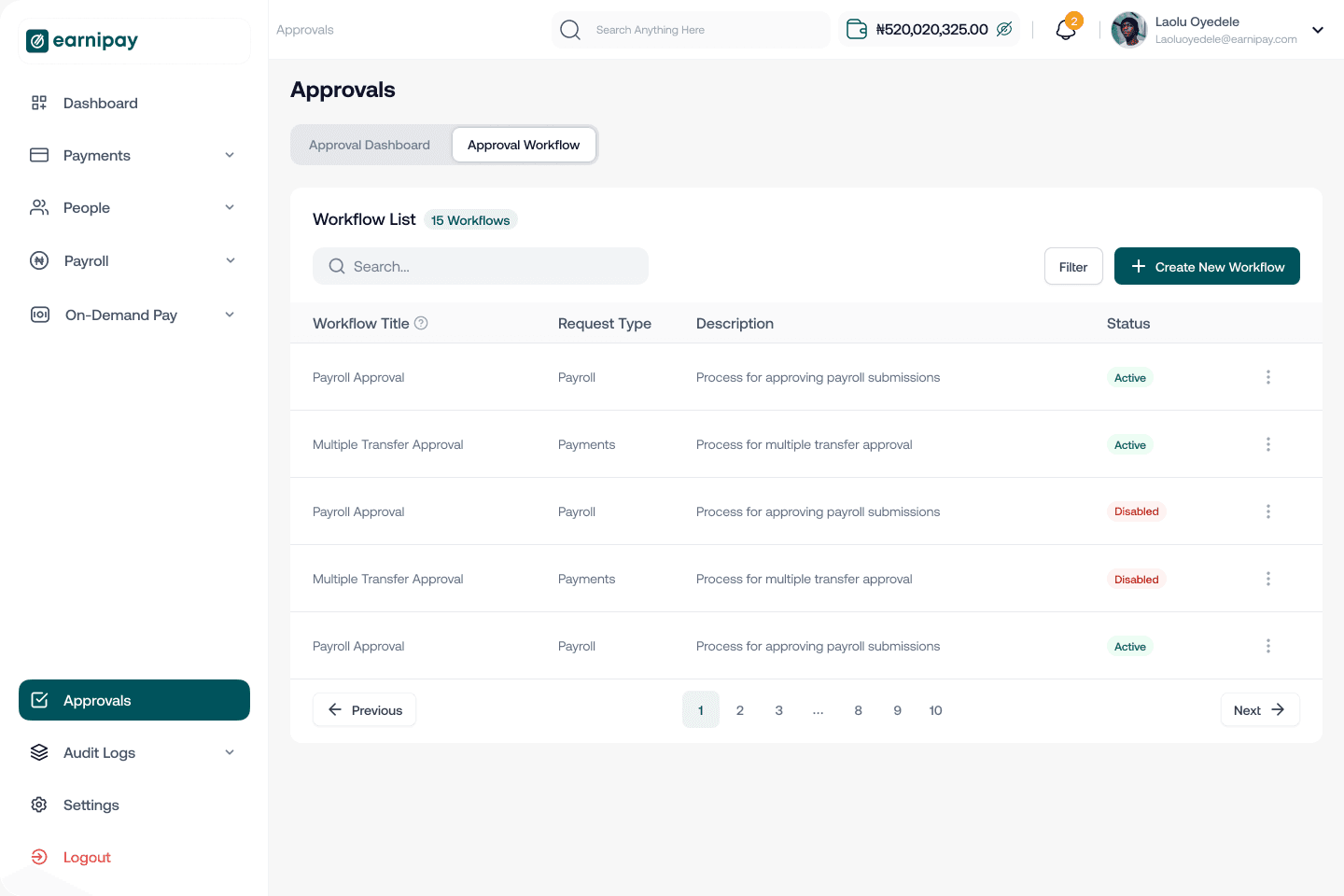
Defining a workflow
First we had to define what an approval workflow actually was.
Before an approval could happen, a business needed a way to tell Earnipay what its approval process should look like. So we started with the workflow itself. A business could define:
- Workflow title
- Description
- Request type
- Request kind
- Workflow stages
That gave the workflow enough context to be understood later, both by the people setting it up and by the members who would meet it as a request.
But there was a bigger question underneath it. How much should we ask for upfront?
We could have made the setup extremely detailed and given businesses control over everything. That would have made a simple approval workflow feel like configuring enterprise software.
Capture what the workflow needs without making setup feel like work.
So we kept the creation process to the things that actually define the workflow, and nothing else.
03
Stages
A workflow isn't really a workflow until there is a sequence.
That is where stages came in. Instead of treating approval as one isolated action, we let a business define the stages a request should move through.
A request enters
It moves through its stages
It reaches an approver
It gets a decision
The workflow
Defines how a request moves.
The dashboard
Defines what needs attention right now.
That distinction turned out to matter more than anything else on the configuration side.
04
Where requests go
Once the workflow existed, requests needed somewhere to go.
We had the rules. The next question was much more practical. When a request actually arrives, where does the approver see it?
We did not want approval to feel like a separate destination people had to remember to check. So the dashboard became the starting point. Requests that needed attention were surfaced there, giving an approver an immediate view of what was waiting for them.
The important information was visible without anyone opening several layers of the product. There is a request. It needs your attention. You can review it.
That made the dashboard more than a collection of numbers. It became the place where work showed up.
05
The decision
The decision happens inside the request.
Once an approver opens a request, the experience becomes deliberately simple. They review it, and they have two clear actions: approve, or reject. There was no need to introduce complexity at the point of decision. Our job was to make that decision obvious.
But rejection is also a decision.
Approval is easy to understand. Something was requested, someone approved it. Rejection is different. If a request is rejected, the person who created it needs to understand what happened. So rejection is not just a status. It needs context.
What the requester used to see
Rejected.
What they see now
Rejected, and the reason the approver gave for it.
The approver gives a reason when they reject, and that reason becomes part of the request's history. That small piece of context is what makes the workflow useful after the decision has been made.
06
Every decision leaves a trail
Every decision leaves a trail.
The other thing we wanted to make explicit was when a decision happened. Every approval and every rejection carries a timestamp.
What the request shows
What it tells you
Created
Who raised it, and when
In progress
Which stage it has reached
Approved or rejected
Who decided, and when
Reason
Why, when the answer was no
We did not need to turn this into a complicated audit system for the experience to be useful. The important thing was making the history visible enough that people could understand what happened.
07
Two experiences
The workflow became two experiences.
By this point the product had two connected but very different jobs.
01 Configure
The business defines how requests should be handled. Title, description, request type, request kind, stages.
02 Execute
Members meet the workflow as requests move through it. Request, review, approve or reject, record.
That separation clarified the whole experience. The person creating the workflow is thinking about how the process should work. The person approving a request is thinking about what they need to decide right now.
Neither of them should have to think about the other one's job.
08
What we kept simple
There was always a temptation to add more.
More configuration. More statuses. More information. More controls. But approval is one of those experiences where complexity easily hides the thing that matters.
So we kept coming back to three questions.
- Can I understand what this workflow is for?
- Can I understand what this request needs from me?
- Can I understand what happened afterwards?
If the answer was yes, the workflow was doing its job.
09
From request to decision
From request to decision.
The finished experience is a straightforward sequence. Every step is small. The system is what they add up to.
01
Create the workflow
02
Define its request and stages
03
A request is created
04
It appears for the right approver
05
The approver reviews it
06
Approve or reject
07
Decision and time are recorded
The individual interactions are simple. Together they make a predictable way to handle requests across a whole business.
Requests that used to sit for 6 hours were resolved in about 2.5 hours. Finance teams could see what needed their attention without asking where an approval was.
10
What I found interesting
A workflow looks small when you describe it as a list of screens.
Create workflow. View request. Approve. Reject. But the real product is the relationship between those screens.
A workflow has rules. Those rules create requests. Requests create decisions. Decisions create history. And that history is what gives everyone involved confidence about what happened.
That is where the design work really was. Not in making approval complicated, but in making the whole journey clear, predictable and easy to follow.
Nobody remembers an approval that worked. That is roughly the point of one.